Large gradients at edges
In certain circumstances, the gradient Deepwave calculates for cells at the edge of the model is much larger than for other cells. This example shows when that happens, explains why, and, since it is usually undesirable, proposes some ways to avoid it:
source_amplitudes=deepwave.wavelets.ricker(25, 200, 0.004,
                                           0.06).reshape(1, 1, -1)
source_locations=torch.tensor([[[0, 10]]])
receiver_locations=torch.tensor([[[0, 90]]])

v_true = 1500 * torch.ones(50, 100)
v = 1600 * torch.ones(50, 100)
v.requires_grad_()

out_true = deepwave.scalar(
    v_true, grid_spacing=4, dt=0.004,
    source_amplitudes=source_amplitudes,
    source_locations=source_locations,
    receiver_locations=receiver_locations
).receiver_amplitudes

out = deepwave.scalar(
    v, grid_spacing=4, dt=0.004,
    source_amplitudes=source_amplitudes,
    source_locations=source_locations,
    receiver_locations=receiver_locations
).receiver_amplitudes

torch.nn.MSELoss()(out, out_true).backward()
It is a simple setup, with one source on the left and one receiver on the right, both at the top surface. We generate “true” data with a velocity of 1500 m/s, then generate data using a model with a velocity of 1600 m/s. Calculating the MSE loss between the two and backpropagating gives the gradient of the loss with respect to the velocity model, stored in v.grad. Plotting it shows a line of high amplitudes, one cell thick, at the top surface.
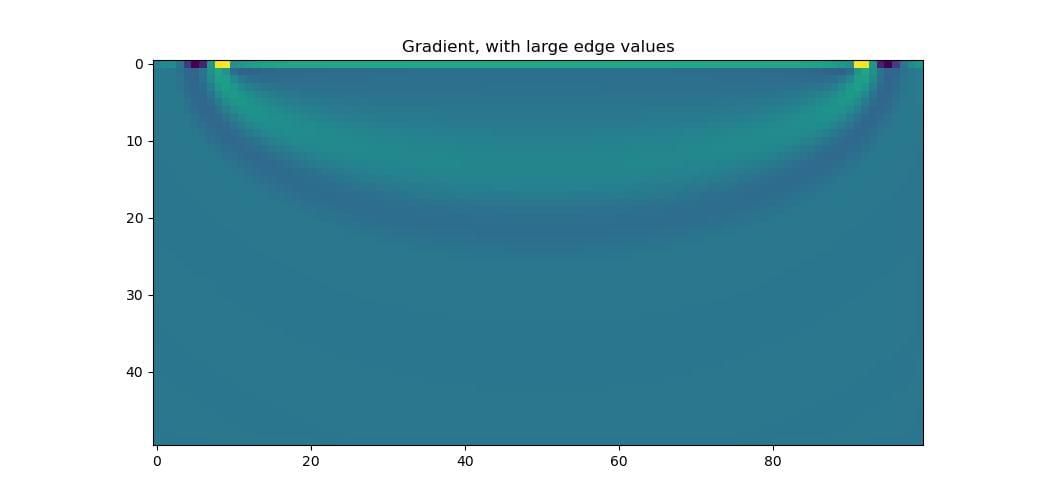
This is caused by the absorbing PML boundary. For the calculated gradient to be fully correct, Deepwave includes the effect of the PML in the gradient calculation. Some waves travel into the PML region and reach the receiver without being fully attenuated, so there is a non-zero gradient in the PML region: changing the velocity there would affect these waves and so change the recorded data. Deepwave uses the velocity at the edge of the model as the velocity throughout the PML, so these gradients from the PML region are all assigned to the cells at the model’s edge. That is what produces the one-cell-thick layer of large gradients there.
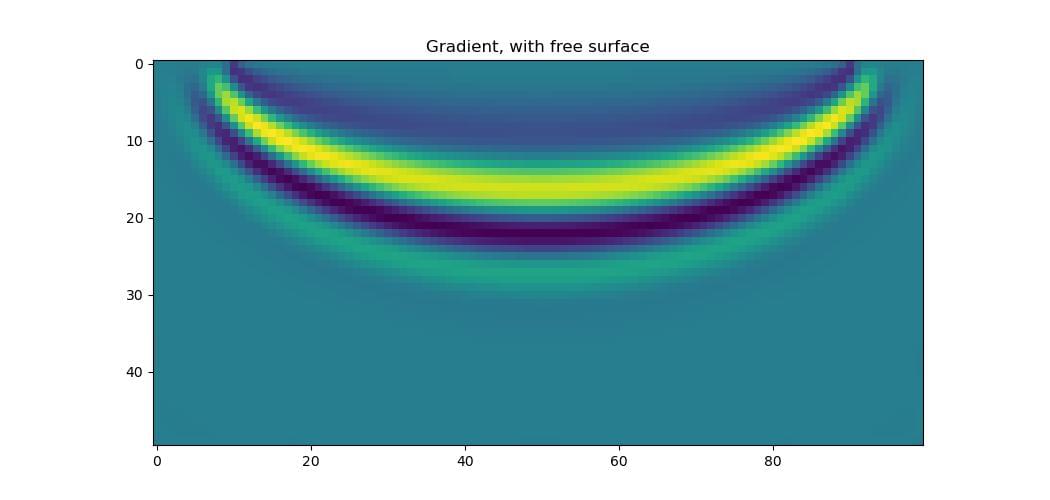
There are several ways to reduce this effect. One, already seen in a previous FWI example, is gradient clipping, which avoids large gradients at a small number of cells. A better solution is a rigid surface at the top of the model: setting the PML width there to zero turns it into a reflective surface. This avoids the problem entirely, since there is then no PML region there for waves to travel through, and so no contribution to the gradient from it. The optional pml_width parameter sets the width of the PML on each surface of the model. A reflective top surface (where the source and receiver are) with a PML width of 20 cells on the other surfaces is therefore pml_width=[0, 20, 20, 20], since the top is the beginning of the first dimension here. To make the beginning of the second dimension the reflective surface instead, use pml_width=[20, 20, 0, 20]:
out_true = deepwave.scalar(
    v_true, grid_spacing=4, dt=0.004,
    source_amplitudes=source_amplitudes,
    source_locations=source_locations,
    receiver_locations=receiver_locations,
    pml_width=[0, 20, 20, 20]  # <--
).receiver_amplitudes

out = deepwave.scalar(
    v, grid_spacing=4, dt=0.004,
    source_amplitudes=source_amplitudes,
    source_locations=source_locations,
    receiver_locations=receiver_locations,
    pml_width=[0, 20, 20, 20]  # <--
).receiver_amplitudes

torch.nn.MSELoss()(out, out_true).backward()
The gradient now has the familiar “banana” shape.
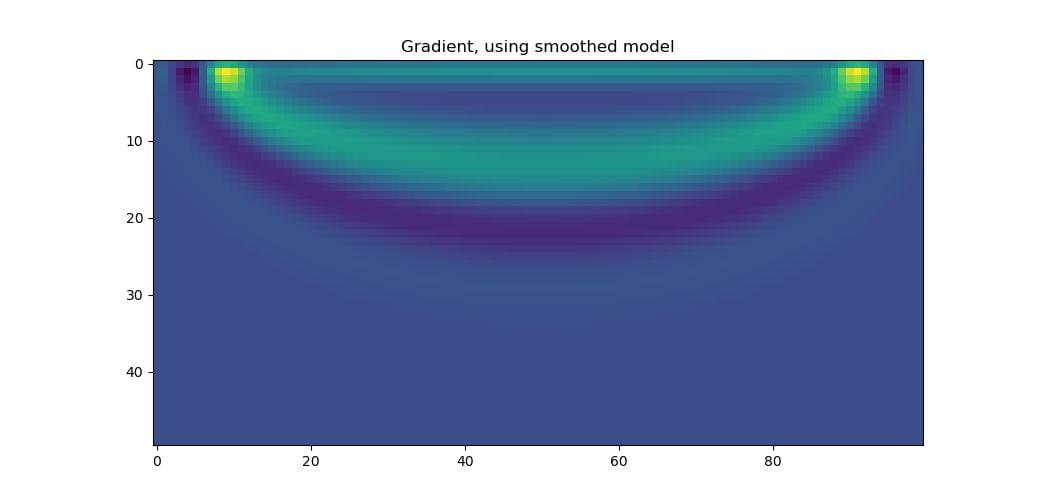
If a reflective surface is not wanted, there are other options. One is to pad the top of the model, moving the sources and receivers further from the surface so that fewer waves pass through the PML region. Tapering the velocity in the padded region to a smaller value, further from the actual model, improves this further, bending waves towards the PML and making them less likely to reach the receivers. Another is to parameterise the model so that a single layer of high amplitudes is not possible, for example by applying a differentiable smoothing function (such as convolution with a Gaussian) to the model before passing it to Deepwave. The gradient that comes out of Deepwave still has the row of large amplitudes, but this gets smoothed out when it is further backpropagated through the smoothing function:
out_true = deepwave.scalar(
    v_true, grid_spacing=4, dt=0.004,
    source_amplitudes=source_amplitudes,
    source_locations=source_locations,
    receiver_locations=receiver_locations
).receiver_amplitudes

# Smooth model
v_smooth = (
    torchvision.transforms.functional.gaussian_blur(
        v[None], [11, 11]
    ).squeeze()
)

out = deepwave.scalar(
    v_smooth,  # <-- Pass smoothed model to Deepwave
    grid_spacing=4, dt=0.004,
    source_amplitudes=source_amplitudes,
    source_locations=source_locations,
    receiver_locations=receiver_locations
).receiver_amplitudes

torch.nn.MSELoss()(out, out_true).backward()
Note that it is v that has requires_grad=True, so the gradients get backpropagated through the smoothing.
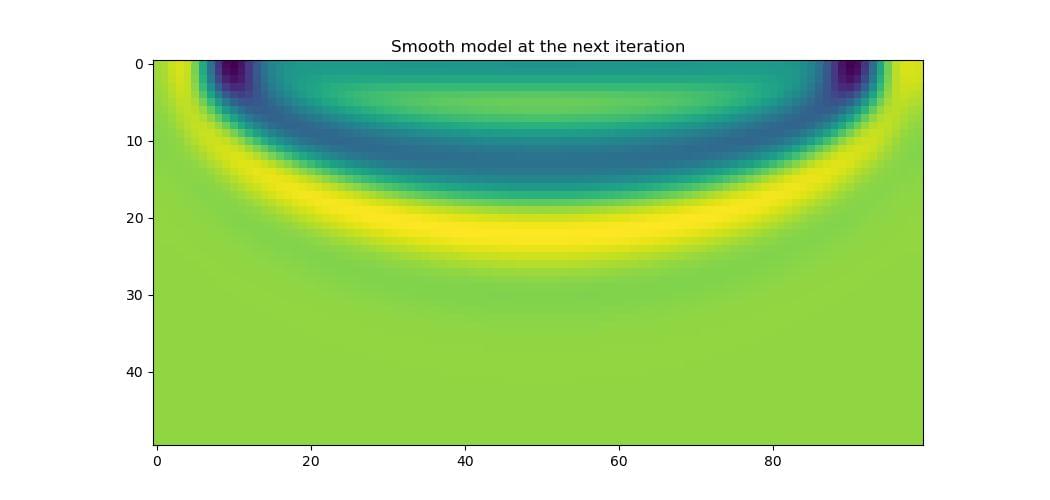
Applying the gradient and then the smoothing function to the model, to get the model that will be passed to Deepwave at the next iteration, we see that the result is smooth, as we desire.